For commercial cleaning companies in Québec

Your cleaning business, under control.

The employee who calls in sick at 6 a.m., replaced before 7. The empty product flagged before the client calls. Who is on site, live. One app, designed in Québec by a former commercial cleaning manager.

  • Nothing to download: it works on the phone
  • Guided setup, step by step
  • Data hosted in Québec
Who replaces whom, in one step
An absence is reported: Onyxia suggests a free replacement for each cleaning, and the text messages are already written.
Before the client calls
The empty product is scanned on site and is already in “To order”, under the client's name.
Who is on site, live
Nobody has clocked in 15 minutes after a cleaning started? You see it, and you get an email.

Made for cleaning

  • Offices
  • Clinics
  • Schools
  • Daycares
  • Garages
  • Condos
  • Stores
  • Warehouses
  • Restaurants
  • Gyms
  • Seniors' residences
  • Factories
The day-to-day of a commercial cleaning manager

Two ordinary evenings. Two problems Onyxia solves.

After several years owning a commercial cleaning company, I built a practical tool, for managers and employees alike.

Tuesday, 7:40 p.m.

“We're out of paper towels.”

The client calls. Nobody noticed the box was empty, and the order never went out.

With Onyxia: the employee scans the empty product on site. It shows up right away in “To order”, under the client's name. One button sends it to your supplier by email.

Wednesday, 6:15 a.m.

“I won't be in tonight.”

An employee is sick. You have to find someone to replace them, or warn the client, before the end of the day.

With Onyxia: the employee reports it from their phone, or you report the absence. Onyxia suggests a free replacement for each cleaning; the text messages to replacements and the messages to clients are already written.

The app, as it really is

Every day, Onyxia tells you what to do.

The screens below are from the app itself, with a demo company and fictitious names. No mock-ups. Click a screen to enlarge it.

Take a tour of the Today screen

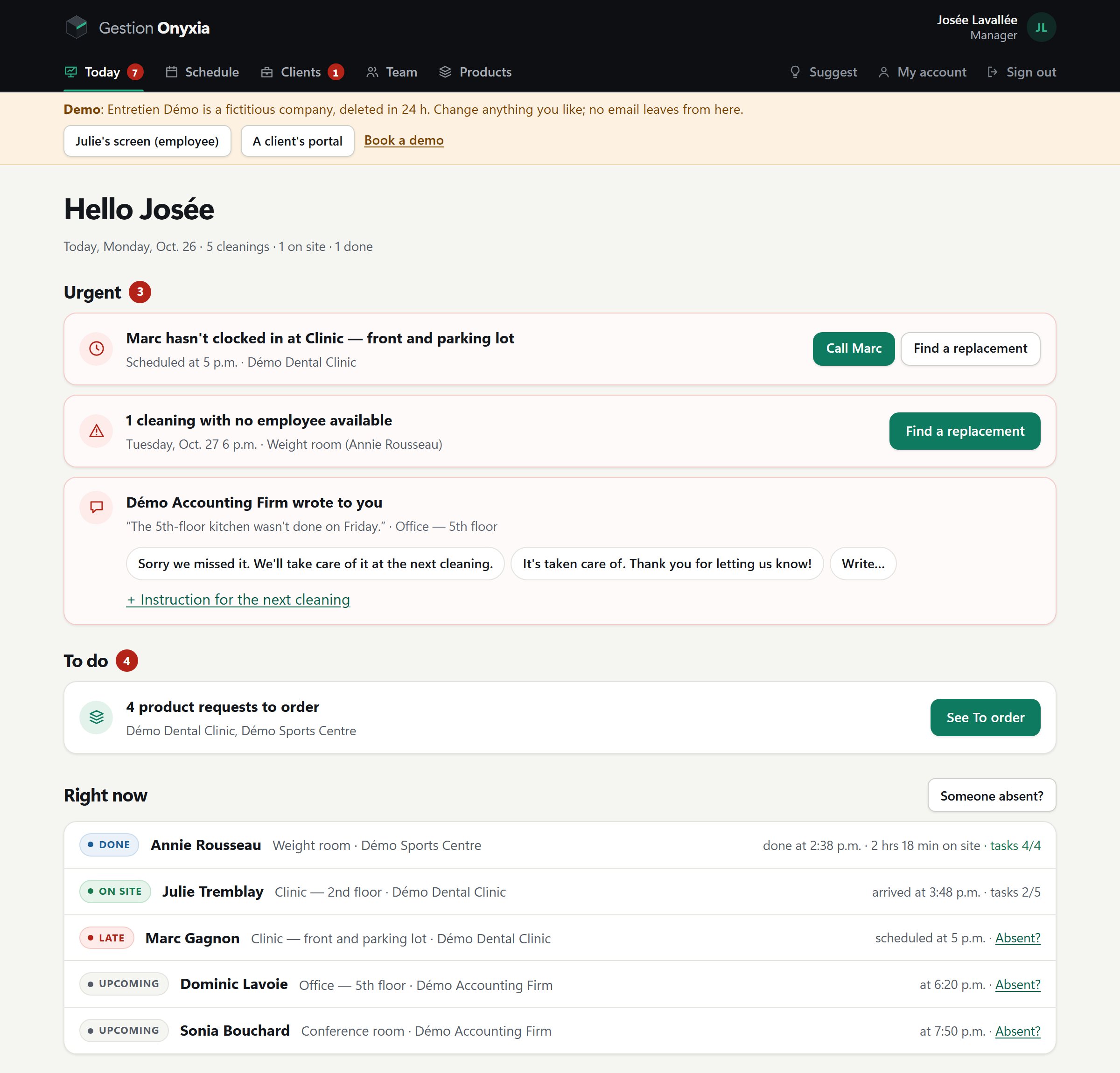
The app's Today screen, with a demo company: an employee who hasn't clocked in, a cleaning with no employee available, a client's message, products to order and who is on site right now.
  1. What's urgent comes first Nobody clocked in 15 minutes after the cleaning started? Onyxia says so here, with the button to call, and emails you too.
  2. The absence, sorted out before the cleaning A cleaning with no employee? “Find a replacement” suggests the employees who are free at that time.
  3. Your clients' messages The client writes from their portal. A ready-made reply, one click, and it goes to them by email too.
  4. The products to order The empty products scanned by your employees, client by client. You send them to the supplier with one button.
  5. Who is on site, right now Done, on site, late or upcoming: every cleaning of the day, live, with its checked-off tasks.
ScheduleOne week at a time, Sunday to Saturday, by employee or by client. An absence, an extra cleaning or a snowstorm: one button each.
To orderThe empty products, client by client. Sent to the supplier by email, or ordered by phone or online; then “Received”.
The week's hoursEach employee's scheduled and clocked hours, with no dollar amounts. An Excel file for your accountant.
My day, on their phoneThe address, the site instructions, “I'm on site”, the tasks to check off. In English or French, as they prefer. Nothing to install.
Seeing is believing

An evening of work, in under two minutes.

The app in action, from the employee's phone to the office screen. Sound is optional.

How it works

One app, three screens. Everyone sees what they need.

Your employees, your clients and you use the same app, on phone or computer, in English or French. Nothing to download from an app store.

Your employees

On their phone

  • Their cleanings, the address and the instructions for each site
  • Arrival and departure in one tap, even without a signal
  • The tasks to check off, including weekly or monthly ones
  • You change their schedule, even from your phone: they see it at the top of their screen, and their “OK, got it” confirms it to you
  • An almost-empty product: they scan it with their phone, and the request reaches you at the office, in “To order”
  • An absence: they let you know in one tap, and you see the cleaning to cover right away
You, the owner

A view of everything

  • A red badge shows you what needs your attention
  • Who is on site right now, and who hasn't clocked in
  • An absence reported, the cleaning to cover and the client to notify
  • The schedule, extra cleanings and holidays
  • Messages from your clients, and your team's notes and photos
  • The products to order, client by client
  • Alarm codes, encrypted, only for the employees you choose
  • The week's hours, for your accountant
  • Quotes, and the flat-rate invoice every month
Your clients

A portal, by invitation

  • Access that you create and give them
  • Their cleanings, and the team's presence, live
  • The tasks done at each cleaning
  • A message to your company; your answer reaches them by email too
  • Their own shopping list, for the products they buy themselves
What makes the difference

No two contracts are alike. Onyxia knows it.

Most often, you supply the cleaning products, and the client buys their paper, soap and garbage bags. For another client, you supply everything; for a third, nothing. Each contract says who supplies what, and Onyxia only tracks the products you supply.

01

Cleaning only

Cleaning products
The client supplies
Hygiene products
The client supplies

The client buys all their products. You only do the cleaning.

02

Cleaning + cleaning products included

Cleaning products
You supply them
Hygiene products
The client supplies

The most common: paper, hand soap and garbage bags stay with the client.

03

Cleaning, cleaning products and hygiene products included

Cleaning products
You supply them
Hygiene products
You supply them

You supply and order all the products, even paper and hand soap.

“To order”, client by client. Your products and suppliers are in a catalogue. An empty product is scanned by the employee; you send it to the supplier by email, with one button; or you order it yourself, by phone or on their website, and tap “Already ordered”. On delivery: “Received”. The products the client buys themselves go on their own shopping list, in their portal.

Everything you need, nothing extra

Built for commercial cleaning.

Your contracts' schedule

Every week, every 2 weeks or every 4 weeks, plus extra cleanings. A cleaning moved, covered or cancelled, and the message to the client already written. Two overlapping cleanings for the same employee are refused.

Absences and replacements

Reported in one step, or by the employee from their phone. A free replacement suggested for each cleaning, the text messages already written. They can withdraw their absence; if a replacement is already booked, you decide.

On-site clock-in

Arrival and departure in one tap. The client sees the team's presence live, and you fix forgotten clock-ins in “Today”.

Barcode scanning

With the phone's camera. A scanned empty product goes into “To order”; a damaged package? Manual entry.

Products and suppliers

The catalogue, your suppliers, and “To order” client by client: sent by email with one button, or “Already ordered” if you ordered it yourself. Then “Received”.

Hours, with no dollar amounts

Each employee's scheduled and clocked hours, week by week, and an Excel file for your accountant. Onyxia doesn't calculate payroll: your accountant does.

Quotes and invoices

A quote with a price, per cleaning or per month. Accepted: the client and their contract are created. Each month, the flat-rate invoice is created in one click, with GST and QST if you have your numbers, and the client sees it in their portal.

Holidays and closures

Onyxia reminds you of upcoming Québec statutory holidays, without ever cancelling a cleaning on its own. A snowstorm or a closed client: the day is cancelled in one go. The schedule prints, too.

Protected alarm codes

The alarm code is encrypted. Only the employees you give access to see it, at any time, until you remove it. Never the client.

Your contracts imported from Excel

Your list of clients and contracts is in Excel? Fill in the template, check the preview line by line, and everything goes in at once. Each new client has their portal access, ready to send.

Security and privacy

Each company sees only its own data. It is hosted in Québec and backed up every night. Québec's Law 25: a full export of your data at any time, and its deletion.

Clock-in even without a signal

No signal in the basement? The app says so, keeps the clock-in on the phone, and sends it by itself as soon as the signal is back, as long as the page stays open.

Missing something?

Ask for it. We'll add it.

Big software companies don't listen to small businesses. At Onyxia, every request is read and considered. If a feature can help other cleaning companies, it gets added to the app. If it's specific to yours, we'll give you a quote.

  1. You suggestThe “Suggest” button is right in the app.
  2. We discuss itYou get an answer: planned addition, quote or explanation.
  3. You follow alongYou see where each of your requests stands, until it goes live.
Who's behind Onyxia?

Not a big software company. A former commercial cleaning manager.

Eric Campeau ran his own commercial cleaning company in Québec. Schedules to redo at the last minute, missing products, calls at dawn because an employee is sick: he lived all of it, day after day.

After years of handling these situations, he decided to build the tool he wished he'd had when he was in the field. That's how Onyxia was born.

Software designed by someone who truly knows the cleaning industry, to help companies save time, reduce oversights and simplify their management.

And when you call Onyxia, you don't reach a call centre on the other side of the world. You speak directly with the person who built the software.

Eric Campeau, founder · 514 475-5027

Launch pricing

Simple pricing, based on your team.

For the first 10 companies subscribing online, launch prices are guaranteed for 12 months. Every feature is included, whatever the tier. Only the number of active employees changes the amount, and nothing is ever blocked: you add whoever you want.

Starter

1 to 5 employees
$39.99/ month
After 12 months: $49.99
Assisted setup on request
Start my trial

Small team

6 to 10 employees
$69.99/ month
After 12 months: $89.99
Assisted setup on request
Start my trial

Medium team

11 to 20 employees
$99.99/ month
After 12 months: $129.99
Assisted setup on request
Start my trial

Large team

21 to 30 employees
$139.99/ month
After 12 months: $179.99
Assisted setup on request
Start my trial
In every tier: every feature, the portal for all your clients, unlimited contracts, assisted setup on request, and direct access to the founder.
Subscribers

Assisted setup, free for subscribers who ask for it. In half a day, by video call, we enter your employees, clients, contracts and products together. Otherwise, Onyxia's step-by-step guide takes you from the first employee to the first schedule.

Learn more

Prices in Canadian dollars. Month-to-month subscription, cancel anytime. The monthly price follows the number of active employees on the 1st of the month. Launch prices apply to the first 10 companies subscribing online: they do not change during their first 12 full months of subscription, then regular prices apply, with written notice 30 days in advance. A stopped subscription loses its launch price. More than 30 employees: write to us. To see before you decide: try the demo, no sign-up.

30-day free trial, no credit card, by creating your company yourself, in two minutes: you enter your real data. When the trial ends, nothing is charged automatically; without a subscription, access closes. If you cancel a subscription, access stays open until the end of the paid month. You can export your data at any time during the trial or the subscription; after the end, we keep it 30 days (a copy on request), then delete it from the application. Onyxia doesn't calculate payroll: the hours go to your accountant.

Frequently asked questions

Before you start

Do my employees have to download an app?

No. They open a link on their phone (iPhone or Android), or scan a QR code, and can add it to their home screen. Onyxia then opens like any regular app.

Is Onyxia available in English?

Yes. Everyone picks their language with one tap: you, each employee and each client. What a person receives, their schedule or your replies, is in their language; a quote for an English-speaking client can be bilingual, French first.

Does Onyxia do payroll and invoices?

Invoices, yes: each month, the flat-rate invoice for each contract, with GST and QST if you have your numbers, which the client sees in their portal; and a manual invoice when needed. Payroll, no: Onyxia keeps each employee's scheduled and clocked hours, week by week (Sunday to Saturday), and gives you an Excel file for your accountant. Payroll and filings are done outside Onyxia, with your accountant or your accounting software. In the app, links lead to the official websites (CNESST, CPEEP, Revenu Québec…); Onyxia gives no legal advice.

Is Onyxia available outside Québec?

No. Onyxia is made for cleaning companies in Québec: its statutory holidays, taxes and useful links are Québec's.

How long does it take to get started?

Half a day. Onyxia's step-by-step guide walks you through it: your employees, clients, contracts and products. Your list of contracts is already in Excel? It imports in one go. Then each employee gets their access, by a link or a QR code. A subscriber who'd rather do it with us? Assisted setup, by video call, is free on request.

Where is my data? Who can see it?

It's on a server in Québec and backed up every night, encrypted, to another location. Only your company sees its data; your clients see only their own contracts. Onyxia support only enters your account if you open it (except for security or when the law requires it); when you open it, you see every entry and every change it makes. Your data belongs to you: you can export it at any time during the trial or the subscription; after the end, we keep it 30 days, then delete it (the encrypted backups, at the latest 12 months later).

Do my products already have a barcode?

Most do: Onyxia uses the barcode printed on the packaging. A catalogue and manual entry are also available for products without a readable code.

Is there a long-term contract?

No. The subscription is month to month. If you leave, you export all your data.

I'm missing a feature. What can I do?

Ask for it with the “Suggest” button in the app, or write to us: we'll add it.

Any questions?

Eric calls you back, often within the hour.

Leave your name and phone number: Eric answers your questions himself, no commitment. To start right away: create your company, 30 days free, no credit card.

or call 514 475-5027

Eric calls back quickly, often within the hour. To write directly: info@gestiononyxia.ca. Assisted setup is free for subscribers, on request. Not ready to call yet? Try the demo on your own.

Start the free trial